
Four high quality stems.
Separate your sample into drums, bass, vocals, and other instruments. Balance the four stems, then choose which ones each slice plays.
Choose Fast for quicker separation, or Quality for higher quality.
The best sample chopping plugin. By far.
Works in all major DAWs with VST3 or AU support.
Pro Tools requires AAX and is not supported.

FlipCraft 2 features TaffyTone, engineered for exceptional sound even at dramatic stretches. Change speed and pitch independently, with optional formant preservation to retain vocal character.
Hearing is believing...
Checking availability…
Separate your sample into drums, bass, vocals, and other instruments. Balance the four stems, then choose which ones each slice plays.
Choose Fast for quicker separation, or Quality for higher quality.
Record an instrument, microphone, or audio from another DAW track straight into FlipCraft. Hit Stop & Load and your take is ready to chop.
Capture incoming audio as a stereo 32-bit float WAV, directly into the deck you choose. Go from playing a sound to playing its slices in one place.
* Requires a DAW that supports routing audio into instrument plugins.
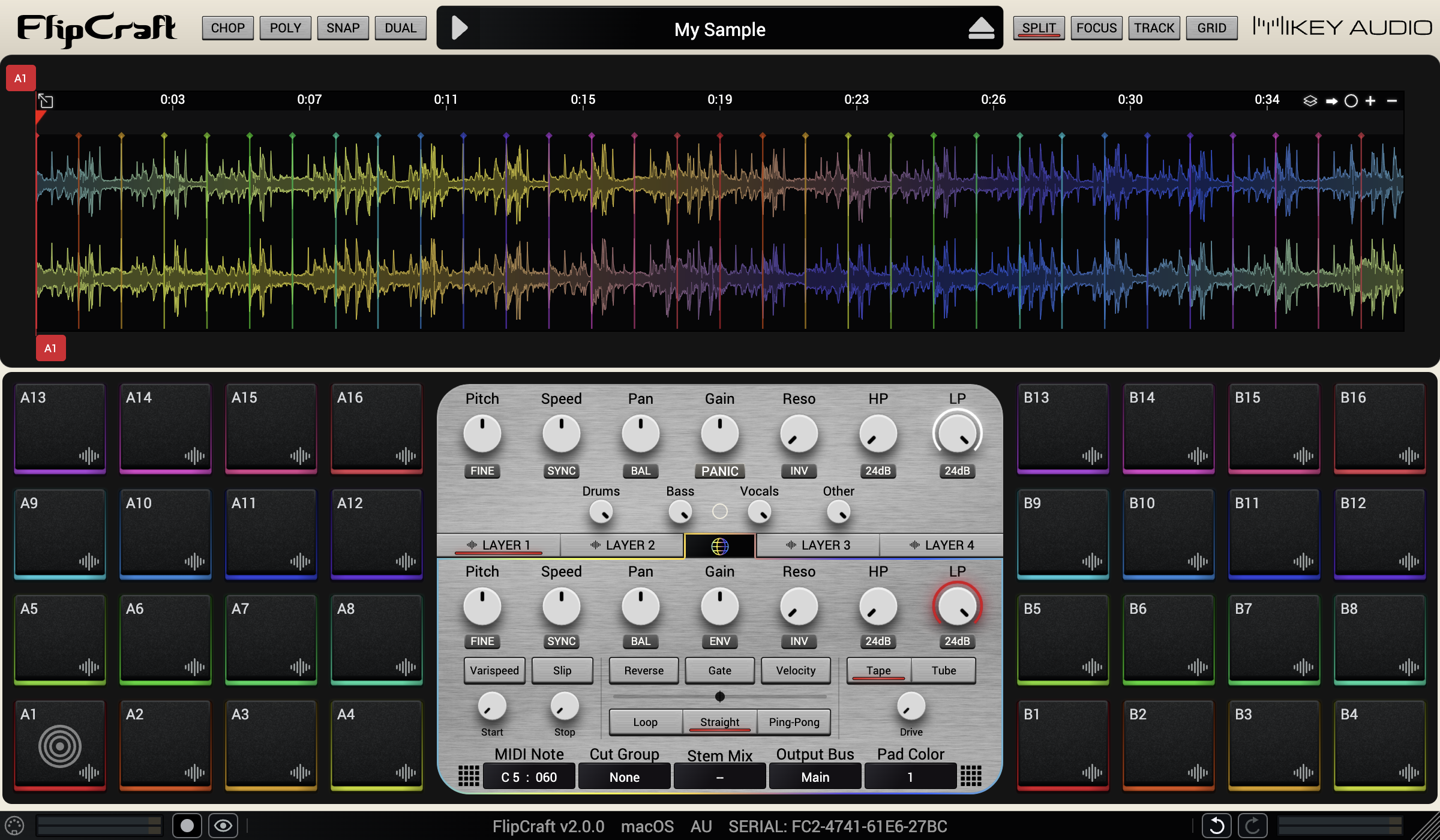
The upper controls shape the entire deck. The lower controls let you fine-tune each slice, from pitch, speed, pan, and gain to filters, envelopes, playback modes, and drive.
Give each slice a sharp attack, a slow build, or a smooth fade with its own adjustable envelope.
Summon your inner DJ with per-slice Tape Start and Tape Stop, spinning sounds up and slowing them to a stop in Varispeed mode. Hold Slip to reverse a playing slice, then release to return to where it would have been.
See your sound in exceptional detail. FlipCraft’s high-resolution waveform stays crisp as you zoom from the full recording down to individual samples, so you can place every cut precisely.
Turn on Vinyl Mode to scratch the waveform forward or backward, even with playback stopped. Adjust how long a flick coasts and how loud the scrub plays.
Choose a beat grid for rhythmic cuts or a transient grid to find individual hits. Adjust transient sensitivity, then let AutoChop place your slices at the detected markers. Randomize the selection to discover a different starting point.
Turn on deck SYNC to lock your sample’s playback speed to your DAW’s tempo, even as the tempo changes. Automate slice start positions in free time or synced to the beat.
Prefer to chop by ear? Tap pads as the sample plays, or use one-key Lazy Chop to fill the next empty pad. Lock your favorite slices while you explore the rest.
Map your controller to everything from chopping and recording to waveform navigation, stem mixes, and sound shaping. Use MIDI Learn with pads, knobs, and buttons.
Let each slice stop where the next one begins, or define a slice playback region. You decide.
Adjust each slice’s start and end independently. Make slices overlap, leave gaps between them, or move a whole slice while keeping its length. Choose the behavior that feels right, then save it for every new instance.
Start with 48 skins, then make your own. Recolor the body, waveforms, panels, screens, text, LEDs, and logos. Choose Modern or Classic pads, generate a pad color palette, or edit all 16 pad colors individually.
Fine-tune glow, shading, and animated waveform colors. Keep up to 16 named appearance presets ready to load, and save your favorite look as the default for new instances.
Give your empty decks a new scene.
Download screensaversFlipCraft comes with screensavers to set the vibes. These exclusive custom designs celebrate the power users who have supported FlipCraft since the beginning.
Spread your chops across four layers, with 32 pads in each. Use DUAL mode to bring two different samples into the same kit.
Switch to Bird’s-Eye View to see all 128 pads at once and keep track of your sounds across the whole kit.
Turn a slice into a melody, bass line, or chord. Keyboard Mode spreads it across the pads with 77 scales to explore, while each note keeps its own envelope, filters, and pan.
Play a melody on one layer and keep your chops on another. Build variations, layer sounds, and follow the next idea.